<?xml version="1.0" encoding="utf-8"?>
<feed xmlns="http://www.w3.org/2005/Atom">
    <title>ADO工具箱</title>
    <link href="https://dongyiliang.github.io/gh-pages/feed.xml" rel="self" />
    <link href="https://dongyiliang.github.io/gh-pages" />
    <updated>2022-07-27T11:26:49+08:00</updated>
    <author>
        <name>yiliang.dong</name>
    </author>
    <id>https://dongyiliang.github.io/gh-pages</id>

    <entry>
        <title>银掠配装</title>
        <author>
            <name>yiliang.dong</name>
        </author>
        <link href="https://dongyiliang.github.io/gh-pages/yin-lue-pei-zhuang.html"/>
        <id>https://dongyiliang.github.io/gh-pages/yin-lue-pei-zhuang.html</id>
            <category term="银河掠夺者"/>

        <updated>2022-07-27T11:26:49+08:00</updated>
            <summary>
                <![CDATA[
                    建议阵容 建议阵容 (1)芬(2)芬角堂 (1)中路芬 极冷 电池 盾修 舰长:卡琳 (2)边路芬 强袭 主炮 炎龙 舰长:所长/黑医 独角 紫防 盾修 电池 舰长:博士 圣堂 盾修 隐身/静滞 无人机网络 圣堂舰长 公主 独角自动 3阶中和激光炮4 3阶撤甲1 圣堂自动(盾修 隐身 无人机网络) 3阶加农1 3阶撤甲1 2阶撤甲3/(盾修 静滞 无人机网络)3阶撤甲2 3阶加农*1 圣堂
                ]]>
            </summary>
        <content type="html">
            <![CDATA[
                <h1 id="建议阵容">建议阵容</h1>
<p>建议阵容 (1)芬(2)芬角堂<br>(1)中路芬 极冷 电池 盾修 舰长:卡琳
(2)边路芬 强袭 主炮 炎龙 舰长:所长/黑医
独角 紫防 盾修 电池 舰长:博士
圣堂 盾修 隐身/静滞 无人机网络</p>
<p>圣堂舰长 公主
独角自动 3阶中和激光炮<em>4 3阶撤甲</em>1
圣堂自动(盾修 隐身 无人机网络) 3阶加农<em>1 3阶撤甲</em>1 2阶撤甲<em>3/(盾修 静滞 无人机网络)3阶撤甲</em>2 3阶加农*1</p>
<h1 id="不朽">不朽</h1>
<p><figure class="post__image"><img loading="lazy" src="https://dongyiliang.github.io/gh-pages/media/posts/47/1.jpg" sizes="(max-width: 48em) 100vw, 768px" srcset="https://dongyiliang.github.io/gh-pages/media/posts/47/responsive/1-xs.jpg 300w ,https://dongyiliang.github.io/gh-pages/media/posts/47/responsive/1-sm.jpg 480w ,https://dongyiliang.github.io/gh-pages/media/posts/47/responsive/1-md.jpg 768w ,https://dongyiliang.github.io/gh-pages/media/posts/47/responsive/1-lg.jpg 1024w ,https://dongyiliang.github.io/gh-pages/media/posts/47/responsive/1-xl.jpg 1360w ,https://dongyiliang.github.io/gh-pages/media/posts/47/responsive/1-2xl.jpg 1600w"  alt="Image description" width="2688" height="1242" /></figure></p>
<h1 id="圣堂">圣堂</h1>

            ]]>
        </content>
    </entry>
    <entry>
        <title>git去除版本控制信息</title>
        <author>
            <name>yiliang.dong</name>
        </author>
        <link href="https://dongyiliang.github.io/gh-pages/gitqu-chu-ban-ben-kong-zhi-xin-xi.html"/>
        <id>https://dongyiliang.github.io/gh-pages/gitqu-chu-ban-ben-kong-zhi-xin-xi.html</id>
            <category term="git"/>

        <updated>2022-05-24T17:32:37+08:00</updated>
            <summary>
                <![CDATA[
                    去除git的版本控制，有两种方式。 1.可以直接将其中的.git文件找出并删除 2.还可以通过命令的方式来操作。如下 你需要先打开项目文件， 然后,在文件中选择git bash here,进入git命令 git会进入当前文件目录， 然后执行如下命令： find . -name “.git” | xargs rm -Rf 该项目就会去除git的版本控制了。再修改的话也不会影响git的版本库。
                ]]>
            </summary>
        <content type="html">
            <![CDATA[
                <h3 id="去除git的版本控制，有两种方式。">去除git的版本控制，有两种方式。</h3>
<p>1.可以直接将其中的.git文件找出并删除</p>
<p>2.还可以通过命令的方式来操作。如下</p>
<p>你需要先打开项目文件，</p>
<p>然后,在文件中选择git bash here,进入git命令</p>
<p>git会进入当前文件目录，</p>
<p>然后执行如下命令：</p>
<p>find . -name “.git” | xargs rm -Rf</p>
<p>该项目就会去除git的版本控制了。再修改的话也不会影响git的版本库。</p>

            ]]>
        </content>
    </entry>
    <entry>
        <title>我的世界python环境</title>
        <author>
            <name>yiliang.dong</name>
        </author>
        <link href="https://dongyiliang.github.io/gh-pages/wo-de-shi-jie-pythonhuan-jing.html"/>
        <id>https://dongyiliang.github.io/gh-pages/wo-de-shi-jie-pythonhuan-jing.html</id>
            <category term="环境配置"/>
            <category term="我的世界"/>
            <category term="python"/>

        <updated>2022-05-22T17:27:23+08:00</updated>
            <summary>
                <![CDATA[
                    python环境 //我的世界python目前只能用2.7版本，不能使用3版本。先激活python27环境 conda activate python27 //补全库 python -m pip install mc-netease-sdk //升级库 python -m pip install --upgrade mc-netease-sdk
                ]]>
            </summary>
        <content type="html">
            <![CDATA[
                <h1 id="python环境">python环境</h1>
<pre><code>//我的世界python目前只能用2.7版本，不能使用3版本。先激活python27环境
conda activate python27

//补全库
python -m pip install mc-netease-sdk

//升级库
python -m pip install --upgrade mc-netease-sdk
</code></pre>

            ]]>
        </content>
    </entry>
    <entry>
        <title>【Python】ConfigParser读取配置文件出现ConfigParser.MissingSectionHeaderError</title>
        <author>
            <name>yiliang.dong</name>
        </author>
        <link href="https://dongyiliang.github.io/gh-pages/python-configparserdu-qu-pei-zhi-wen-jian-chu-xian-configparsermissingsectionheadererror.html"/>
        <id>https://dongyiliang.github.io/gh-pages/python-configparserdu-qu-pei-zhi-wen-jian-chu-xian-configparsermissingsectionheadererror.html</id>
            <category term="环境配置"/>
            <category term="python"/>

        <updated>2022-05-22T16:18:22+08:00</updated>
            <summary>
                <![CDATA[
                    问题描述 pip安装包显示异常 (python27) D:\pyspace&gt;python -m pip install mc-netease-sdk Traceback (most recent call last): File &quot;D:\apps\anaconda3\envs\python27\lib\runpy.py&quot;, line 174, in _run_module_as_main &quot;__main__&quot;, fname, loader, pkg_name) File &quot;D:\apps\anaconda3\envs\python27\lib\runpy.py&quot;, line 72, in _run_code exec code in run_globals File &quot;D:\apps\anaconda3\envs\python27\lib\site-packages\pip\__main__.py&quot;, line 19, in &lt;module&gt; sys.exit(pip.main()) File &quot;D:\apps\anaconda3\envs\python27\lib\site-packages\pip\__init__.py&quot;, line 233, in&hellip;
                ]]>
            </summary>
        <content type="html">
            <![CDATA[
                <h1 id="问题描述">问题描述</h1>
<p>pip安装包显示异常</p>
<pre><code>(python27) D:\pyspace&gt;python -m pip install mc-netease-sdk
Traceback (most recent call last):
  File &quot;D:\apps\anaconda3\envs\python27\lib\runpy.py&quot;, line 174, in _run_module_as_main
    &quot;__main__&quot;, fname, loader, pkg_name)
  File &quot;D:\apps\anaconda3\envs\python27\lib\runpy.py&quot;, line 72, in _run_code
    exec code in run_globals
  File &quot;D:\apps\anaconda3\envs\python27\lib\site-packages\pip\__main__.py&quot;, line 19, in &lt;module&gt;
    sys.exit(pip.main())
  File &quot;D:\apps\anaconda3\envs\python27\lib\site-packages\pip\__init__.py&quot;, line 233, in main
    cmd_name, cmd_args = parseopts(args)
  File &quot;D:\apps\anaconda3\envs\python27\lib\site-packages\pip\__init__.py&quot;, line 159, in parseopts
    parser = create_main_parser()
  File &quot;D:\apps\anaconda3\envs\python27\lib\site-packages\pip\__init__.py&quot;, line 137, in create_main_parser
    parser = ConfigOptionParser(**parser_kw)
  File &quot;D:\apps\anaconda3\envs\python27\lib\site-packages\pip\baseparser.py&quot;, line 148, in __init__
    self.config.read(self.files)
  File &quot;D:\apps\anaconda3\envs\python27\lib\ConfigParser.py&quot;, line 305, in read
    self._read(fp, filename)
  File &quot;D:\apps\anaconda3\envs\python27\lib\ConfigParser.py&quot;, line 512, in _read
    raise MissingSectionHeaderError(fpname, lineno, line)
ConfigParser.MissingSectionHeaderError: File contains no section headers.
file: C:\Users\dongyiliang\pip\pip.ini, line: 1
&#39; [global]\n&#39;
</code></pre>
<h1 id="问题原因">问题原因</h1>
<p>用ConfigParser读取配置文件的程序调用后发现文件头部被追加了信息：\xef\xbb\xbf，然后ConfigParser解析出错
\xef\xbb\xbf的出现原因：在Window下记事本、notepad++等文本编辑器编辑后，若保存为不同的编码格式会在文件开头加上BOM</p>
<pre><code>UNICODE： \xFF\xFE
UTF-8：\xEF\xBB\xBF
</code></pre>
<h1 id="解决方法">解决方法</h1>
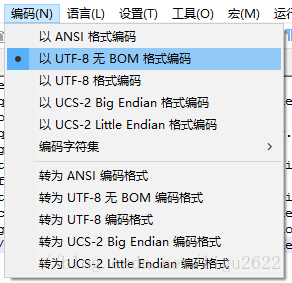
<p>用notepad++将文件编码修改为以UTF-8无BOM格式编码，然后保存文件就行了。
<figure class="post__image"><img loading="lazy" src="https://dongyiliang.github.io/gh-pages/media/posts/43/20180319103835880.png" sizes="(max-width: 48em) 100vw, 768px" srcset="https://dongyiliang.github.io/gh-pages/media/posts/43/responsive/20180319103835880-xs.png 300w ,https://dongyiliang.github.io/gh-pages/media/posts/43/responsive/20180319103835880-sm.png 480w ,https://dongyiliang.github.io/gh-pages/media/posts/43/responsive/20180319103835880-md.png 768w ,https://dongyiliang.github.io/gh-pages/media/posts/43/responsive/20180319103835880-lg.png 1024w ,https://dongyiliang.github.io/gh-pages/media/posts/43/responsive/20180319103835880-xl.png 1360w ,https://dongyiliang.github.io/gh-pages/media/posts/43/responsive/20180319103835880-2xl.png 1600w"  alt="Image description" width="292" height="283" /></figure></p>
<h1 id="pipini">pip.ini</h1>
<pre><code>[global]
index-url = https://pypi.doubanio.com/simple/
[install]
trusted-host=pypi.doubanio.com
</code></pre>

            ]]>
        </content>
    </entry>
    <entry>
        <title>flutter国内加速镜像</title>
        <author>
            <name>yiliang.dong</name>
        </author>
        <link href="https://dongyiliang.github.io/gh-pages/flutterguo-nei-jia-su-jing-xiang.html"/>
        <id>https://dongyiliang.github.io/gh-pages/flutterguo-nei-jia-su-jing-xiang.html</id>
            <category term="flutter"/>

        <updated>2022-05-14T15:49:12+08:00</updated>
            <summary>
                <![CDATA[
                    源码安装 git clone https://github.com/flutter/flutter.git -b stable 下面是国内几个镜像， PUB_HOSTED_URL是Dart依赖包地址 FLUTTER_STORAGE_BASE_URL是Flutter依赖文件地址。 要手动下载最新版本的flutter SDK包，可以访问 FLUTTER_STORAGE_BASE_URL 地址，然后进入/flutter_infra/releases/目录下载（这个方式Flutter社区不可用）。 Flutter 社区 社区主镜像，采用多种方式同步 Flutter 开发者资源（推荐）。 $ export PUB_HOSTED_URL=https://pub.flutter-io.cn $ export FLUTTER_STORAGE_BASE_URL=https://storage.flutter-io.cn 上海交大 Linux 用户组 使用反向代理方式建立的 Flutter 镜像，数据与站源实时同步。 Pub API 返回值未做处理，可能造成无法访问的情况。 $ export PUB_HOSTED_URL=https://dart-pub.mirrors.sjtug.sjtu.edu.cn $ export FLUTTER_STORAGE_BASE_URL=https://mirrors.sjtug.sjtu.edu.cn $ export PUB_HOSTED_URL=https://mirrors.tuna.tsinghua.edu.cn/dart-pub $ export FLUTTER_STORAGE_BASE_URL=https://mirrors.tuna.tsinghua.edu.cn/flutter&hellip;
                ]]>
            </summary>
        <content type="html">
            <![CDATA[
                <h3 id="源码安装">源码安装</h3>
<p>git clone <a href="https://github.com/flutter/flutter.git">https://github.com/flutter/flutter.git</a> -b stable</p>
<h3 id=""></h3>
<p>下面是国内几个镜像，
PUB_HOSTED_URL是Dart依赖包地址
FLUTTER_STORAGE_BASE_URL是Flutter依赖文件地址。</p>
<p>要手动下载最新版本的flutter SDK包，可以访问 FLUTTER_STORAGE_BASE_URL 地址，然后进入/flutter_infra/releases/目录下载（这个方式Flutter社区不可用）。</p>
<ul>
<li><p>Flutter 社区
社区主镜像，采用多种方式同步 Flutter 开发者资源（推荐）。
$ export PUB_HOSTED_URL=<a href="https://pub.flutter-io.cn">https://pub.flutter-io.cn</a>
$ export FLUTTER_STORAGE_BASE_URL=<a href="https://storage.flutter-io.cn">https://storage.flutter-io.cn</a></p>
</li>
<li><p>上海交大 Linux 用户组
使用反向代理方式建立的 Flutter 镜像，数据与站源实时同步。 Pub API 返回值未做处理，可能造成无法访问的情况。</p>
</li>
</ul>
<p>$ export PUB_HOSTED_URL=<a href="https://dart-pub.mirrors.sjtug.sjtu.edu.cn">https://dart-pub.mirrors.sjtug.sjtu.edu.cn</a>
$ export FLUTTER_STORAGE_BASE_URL=<a href="https://mirrors.sjtug.sjtu.edu.cn">https://mirrors.sjtug.sjtu.edu.cn</a></p>
<ul>
<li>清华大学 TUNA 协会
定时与 Flutter 社区 Storage 镜像同步，Pub API 采取定时主动抓取策略，镜像配置了完善的失败回源策略（推荐）。</li>
</ul>
<p>$ export PUB_HOSTED_URL=<a href="https://mirrors.tuna.tsinghua.edu.cn/dart-pub">https://mirrors.tuna.tsinghua.edu.cn/dart-pub</a>
$ export FLUTTER_STORAGE_BASE_URL=<a href="https://mirrors.tuna.tsinghua.edu.cn/flutter">https://mirrors.tuna.tsinghua.edu.cn/flutter</a></p>
<ul>
<li>CNNIC
基于 TUNA 协会的镜像服务，数据策略与 TUNA 一致，通过非教育网的域名访问。</li>
</ul>
<p>$ export PUB_HOSTED_URL=<a href="http://mirrors.cnnic.cn/dart-pub">http://mirrors.cnnic.cn/dart-pub</a>
$ export FLUTTER_STORAGE_BASE_URL=<a href="http://mirrors.cnnic.cn/flutter">http://mirrors.cnnic.cn/flutter</a></p>
<ul>
<li>腾讯云开源镜像站
定时（每天凌晨）与 TUNA 协会镜像同步，数据有延迟，访问速度有待反馈。</li>
</ul>
<p>$ export PUB_HOSTED_URL=<a href="https://mirrors.cloud.tencent.com/dart-pub">https://mirrors.cloud.tencent.com/dart-pub</a>
$ export FLUTTER_STORAGE_BASE_URL=<a href="https://mirrors.cloud.tencent.com/flutter">https://mirrors.cloud.tencent.com/flutter</a></p>

            ]]>
        </content>
    </entry>
    <entry>
        <title>github加速</title>
        <author>
            <name>yiliang.dong</name>
        </author>
        <link href="https://dongyiliang.github.io/gh-pages/githubjia-su.html"/>
        <id>https://dongyiliang.github.io/gh-pages/githubjia-su.html</id>
            <category term="环境配置"/>
            <category term="github"/>

        <updated>2022-05-14T11:42:45+08:00</updated>
            <summary>
                <![CDATA[
                    加速地址 fastgit.org：https://doc.fastgit.org/ http://cnpmjs.org：https://github.com.cnpmjs.org/ http://gitclone.com：https://gitclone.com/ gitee：https://gitee.com/mirrors GitHub 文件加速：https://gh.api.99988866.xyz/ Github 仓库加速：https://github.zhlh6.cn/ Github 仓库加速：http://toolwa.com/github/ 加速 clone # 方法一：手动替换地址 #原地址 $ git clone https://github.com/kubernetes/kubernetes.git #改为 $ git clone https://github.com.cnpmjs.org/kubernetes/kubernetes.git #或者 $ git clone https://hub.fastgit.org/kubernetes/kubernetes.git #或者 $ git clone https://gitclone.com/github.com/kubernetes/kubernetes.git # 方法二：配置git自动替换 $ git config --global url.&quot;https://hub.fastgit.org&quot;.insteadOf https://github.com # 测试&hellip;
                ]]>
            </summary>
        <content type="html">
            <![CDATA[
                <h3 id="加速地址">加速地址</h3>
<ol>
<li>fastgit.org：<a href="https://doc.fastgit.org/">https://doc.fastgit.org/</a></li>
<li><a href="http://cnpmjs.org%EF%BC%9Ahttps://github.com.cnpmjs.org/">http://cnpmjs.org：https://github.com.cnpmjs.org/</a></li>
<li><a href="http://gitclone.com%EF%BC%9Ahttps://gitclone.com/">http://gitclone.com：https://gitclone.com/</a></li>
<li>gitee：<a href="https://gitee.com/mirrors">https://gitee.com/mirrors</a></li>
<li>GitHub 文件加速：<a href="https://gh.api.99988866.xyz/">https://gh.api.99988866.xyz/</a></li>
<li>Github 仓库加速：<a href="https://github.zhlh6.cn/">https://github.zhlh6.cn/</a></li>
<li>Github 仓库加速：<a href="http://toolwa.com/github/">http://toolwa.com/github/</a></li>
</ol>
<h3 id="加速-clone">加速 clone</h3>
<pre><code># 方法一：手动替换地址 
#原地址 
$ git clone https://github.com/kubernetes/kubernetes.git 
#改为 
$ git clone https://github.com.cnpmjs.org/kubernetes/kubernetes.git 
#或者 
$ git clone https://hub.fastgit.org/kubernetes/kubernetes.git 
#或者 
$ git clone https://gitclone.com/github.com/kubernetes/kubernetes.git 
 
# 方法二：配置git自动替换 
$ git config --global url.&quot;https://hub.fastgit.org&quot;.insteadOf https://github.com 
# 测试 
$ git clone https://github.com/kubernetes/kubernetes.git 
# 查看git配置信息 
$ git config --global --list 
# 取消设置 
$ git config --global --unset url.https://github.com/.insteadof 
</code></pre>
<h3 id="加速release">加速release</h3>
<pre><code># 原地址 
wget https://github.com/goharbor/harbor/releases/download/v2.0.2/harbor-offline-installer-v2.0.2.tgz 
# 加速下载方法一 
wget https://download.fastgit.org/goharbor/harbor/releases/download/v2.0.2/harbor-offline-installer-v2.0.2.tgz 
# 加速下载方法二 
wget https://hub.fastgit.org/goharbor/harbor/releases/download/v2.0.2/harbor-offline-installer-v2.0.2.tgz 

//测试1
https://hub.fastgit.org/ipfs-desktop/releases/download/v0.20.6/IPFS-Desktop-Setup-0.20.6.exe

https://github.com/ipfs-shipyard/ipfs-desktop/releases/download/v0.20.6/IPFS-Desktop-Setup-0.20.6.exe

</code></pre>
<h3 id="加速-raw">加速 raw</h3>
<pre><code># 原地址 
$ wget https://raw.githubusercontent.com/kubernetes/kubernetes/master/README.md 
# 加速下载方法一 
$ wget https://raw.staticdn.net/kubernetes/kubernetes/master/README.md 
# 加速下载方法二 
$ wget https://raw.fastgit.org/kubernetes/kubernetes/master/README.md
</code></pre>

            ]]>
        </content>
    </entry>
    <entry>
        <title>cygwin安装配置</title>
        <author>
            <name>yiliang.dong</name>
        </author>
        <link href="https://dongyiliang.github.io/gh-pages/cygwinan-zhuang-pei-zhi.html"/>
        <id>https://dongyiliang.github.io/gh-pages/cygwinan-zhuang-pei-zhi.html</id>
            <category term="环境配置"/>
            <category term="windows"/>

        <updated>2022-05-14T10:22:16+08:00</updated>
            <summary>
                <![CDATA[
                    为了方便使用windows下的编辑器写代码并使用make命令，所以在windows上也安装make，windows下使用gcc和g++需要安装MinGW32。 https://www.mingw-w64.org/downloads/ http://cygwin.com/install.html
                ]]>
            </summary>
        <content type="html">
            <![CDATA[
                <p>为了方便使用windows下的编辑器写代码并使用make命令，所以在windows上也安装make，windows下使用gcc和g++需要安装MinGW32。</p>
<h3 id="下载地址">下载地址</h3>
<p><a href="https://www.mingw-w64.org/downloads/">https://www.mingw-w64.org/downloads/</a>
<a href="http://cygwin.com/install.html">http://cygwin.com/install.html</a></p>

            ]]>
        </content>
    </entry>
    <entry>
        <title>cmder快捷键</title>
        <author>
            <name>yiliang.dong</name>
        </author>
        <link href="https://dongyiliang.github.io/gh-pages/cmderkuai-jie-jian.html"/>
        <id>https://dongyiliang.github.io/gh-pages/cmderkuai-jie-jian.html</id>
            <category term="快捷键"/>
            <category term="windows"/>

        <updated>2022-05-12T20:07:10+08:00</updated>
            <summary>
                <![CDATA[
                    快捷键 Tab #命令补全 Ctrl+T #建立新页 Ctrl+W #关闭标签页 Ctrl+Tab #切换标签页 Alt+F4 #关闭所有标签页 Ctrl+n #切换到第n个页签 Alt + Enter #切换到全屏状态
                ]]>
            </summary>
        <content type="html">
            <![CDATA[
                <h3 id="快捷键">快捷键</h3>
<pre><code>Tab #命令补全
Ctrl+T #建立新页
Ctrl+W #关闭标签页
Ctrl+Tab #切换标签页
Alt+F4 #关闭所有标签页
Ctrl+n #切换到第n个页签
Alt + Enter #切换到全屏状态
</code></pre>

            ]]>
        </content>
    </entry>
    <entry>
        <title>爬网站工具templatespider</title>
        <author>
            <name>yiliang.dong</name>
        </author>
        <link href="https://dongyiliang.github.io/gh-pages/pa-wang-zhan-gong-ju.html"/>
        <id>https://dongyiliang.github.io/gh-pages/pa-wang-zhan-gong-ju.html</id>
            <category term="建站工具"/>

        <updated>2022-05-12T18:01:20+08:00</updated>
            <summary>
                <![CDATA[
                    简介 看好哪个网站，指定好URL，自动扒下来做成 html模版。并且所下载的css、js、图片、html文件会自动分好类保存到特定文件夹！ 然后使用 模版计算工具，自动将 html模版计算合成为 网市场云建站系统 可用的模版。 http://www.templatespider.zvo.cn/#rjxz https://gitee.com/mail_osc/templatespider
                ]]>
            </summary>
        <content type="html">
            <![CDATA[
                <h3 id="简介">简介</h3>
<p>看好哪个网站，指定好URL，自动扒下来做成 html模版。并且所下载的css、js、图片、html文件会自动分好类保存到特定文件夹！ 然后使用 模版计算工具，自动将 html模版计算合成为 网市场云建站系统 可用的模版。</p>
<h3 id="下载地址">下载地址</h3>
<p><a href="http://www.templatespider.zvo.cn/#rjxz">http://www.templatespider.zvo.cn/#rjxz</a></p>
<h3 id="源码地址">源码地址</h3>
<p><a href="https://gitee.com/mail_osc/templatespider">https://gitee.com/mail_osc/templatespider</a></p>

            ]]>
        </content>
    </entry>
    <entry>
        <title>webview2安装</title>
        <author>
            <name>yiliang.dong</name>
        </author>
        <link href="https://dongyiliang.github.io/gh-pages/webview2an-zhuang.html"/>
        <id>https://dongyiliang.github.io/gh-pages/webview2an-zhuang.html</id>
            <category term="windows"/>

        <updated>2022-05-12T17:11:19+08:00</updated>
            <summary>
                <![CDATA[
                    下载地址 https://developer.microsoft.com/zh-cn/microsoft-edge/webview2/ https://msedge.sf.dl.delivery.mp.microsoft.com/filestreamingservice/files/6a0e8a9b-21a9-41ef-8dbd-584d151a0433/MicrosoftEdgeWebView2RuntimeInstallerX64.exe
                ]]>
            </summary>
        <content type="html">
            <![CDATA[
                <h3 id="下载地址">下载地址</h3>
<p><a href="https://developer.microsoft.com/zh-cn/microsoft-edge/webview2/">https://developer.microsoft.com/zh-cn/microsoft-edge/webview2/</a></p>
<p><a href="https://msedge.sf.dl.delivery.mp.microsoft.com/filestreamingservice/files/6a0e8a9b-21a9-41ef-8dbd-584d151a0433/MicrosoftEdgeWebView2RuntimeInstallerX64.exe">https://msedge.sf.dl.delivery.mp.microsoft.com/filestreamingservice/files/6a0e8a9b-21a9-41ef-8dbd-584d151a0433/MicrosoftEdgeWebView2RuntimeInstallerX64.exe</a></p>

            ]]>
        </content>
    </entry>
</feed>